Sunday, February 28, 2010

Version Control - a reaction to Martin Fowler's article

Recently I've been involved with looking at how our team produces software. This has meant looking across the spectrum of activities, tools, and practices that we undertake to deliver working software to the business. It was with this activity still fresh in my mind that I stumbled upon Martin Fowler's thoughtful article about Version Control on his Bliki earlier today.

As part of my work I actually put forward an argument that we move away from using SVN for source control and to implement TFS. As somebody who has deep personal affection for the simplicity of SVN, the decision to recommend TFS was not made lightly.

In light of my own decision to move away from SVN and onto TFS, I was motivated to respond to Martin's positioning of TFS on his summary diagram which placed TFS outside of the tools that he would recommend for version control.

Whilst he suggests that TFS is not a recommendable product, Martin does not make any real attempt to explain other than to say that people he trusts don't recommend it. In this article I want to put forward some of the reasons that I chose for recommending TFS as our tool of choice.

Integration
I believe that it is unfair to look at version control in isolation because, whilst your version control software sits at the heart of your development system, it lives within a larger ecosystem. This ecosystem is made up of IDE's, Issue Tracking Software, Build Management Software, Continuous Integration Services, Reporting, and perhaps other tools and services too.

In light of all of this software that comprises your development ecosystem, consider the technology soup that you are managing. Patching and keeping these systems soon becomes a science unto itself and unless you're job is as a specialist build master where you are entitled to choose individual best of breed applications, managing this type of environment may not be for you.

Moving to TFS provides us with a single technology roadmap and vastly reduces the complexity involved in configuring and patching our environment when compared with the alternative.

An illusion of simplicity
In light of having uncovered the elements of a development ecosystem, let's reconsider our views on simplicity. First I'll start with a statement from my own observations about developing software - Developing software is a complex business. FULLSTOP! PERIOD!

As shown in my previous discussion about integration, the complexity is there always. You can have a simple version control tool but the cost of this is that you transfer more of the complexity to other parts of the system. In the case of having chosen SVN, this complexity comes in the form of having to run multiple, independant systems using multiple technologies.

With TFS you gain simplicity through technology consolidation but you pay a price for having to learn how to set up and manage it - but is this any more complex than having to learn half a dozen other systems?

The real business world
So far I've focussed my discussion about the development ecosystem on the activities of the developers themselves. However in the real business world, this is still not a fair representation of what is needed to successfully deliver working software.

Even small businesses have stakeholders that the software is being developed for and in mature businesses, there is an instrument which sits between (or straddles) the business and technology domain - this instrument is the PMO.

In light of this discovery, it is no surprise that building successful software is as much about soft skills - such as communication and reporting - as it is about purely technical pursuits such as coding, building, and releasing.

By integrating with common business software such as Excel and MS Project, the TFS work item tracking system makes it easier to align IT projects with projects in the PMO and have those functions be able to communicate using a common language.

Conclusion
In this article I have opposed Martin Fowler's view in relation to the placement of TFS on his summary diagram. I believe that his article is too narrowly focussed to be of real value when considering what tools to choose in creating your own software development ecosystem.

However I do agree with his closing sentiments wholeheartedly and I could not have put it any better then when he wrote:

Remember that although I've jabbered on a lot about tools here, often its the practices and workflows that make a bigger difference. Tools can certainly make it much easier to use a good set of practices, but in the end it's up to the people to use an effective way of working for their environment. I like to see approaches that allow many small changes that are rapidly integrated using Continuous Integration. I'd rather use a poor tool with CI than a good tool without. 

Tuesday, February 9, 2010

Productive Software Development

Today I read through a thoughtful set of blog posts (about 7 in total) on the topic of software and exerting control over it:


At the bottom of each post is a “Next” link which takes you to the next article.

If you have time to read it I would recommend it and if you do, think in terms of how a chunk of software should look in order that you can examine it under controlled conditions.  These things lie at the heart of the management of dependency management and testing. 

The author (Scott Bellware) leads us to think about how we use efficiency as a lever – and what the consequences of that can be – was also a thoughtful exercise. 

The article also spoke to me in other ways.  An additional concept that I drew out while reading this text was that of authenticity and the motivation that I have for the things that I'm responsible for.

As mentioned by @kzu, this is a verbose style, but a story well told and one which contains some very useful and valid points.

Monday, February 8, 2010

SharePoint (2007 or 2010) Architecture - Part 2: An MVC Style Implementation

Recently I started a code refactoring exercise for some SharePoint code and here I will lay out a very simple architecture that I have implemented for creating web part views. I want to start here because this is the beginning. In a future post I will show you how to refactor this code to introduce more and more patterns of encapsulation to show you how we can grow to accommodate new needs.

The cost of impedance mismatches
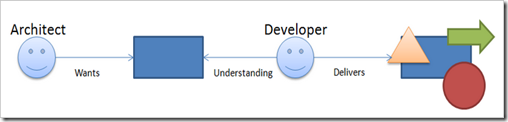
Remember in the first article that I presented an image to highlight how implementations can differ.

image

A major reason for this difference is that, in the absence of clear protocols and contracts, information can easily be lost during communication of expectations. And in the face of differing expectations and outcomes, the result can lead to changes that are hard to check for conformance and difficult to estimate for the purposes of cost.  Additional costs can include excessive rework.
image

So the implementation that I will talk through in this article is primarily designed to introduce a degree of conformance and consistency into the development process. Whilst the code artifacts that will result from this article may violate some architectural norms, what we will be left with will form a good base from which to build upon and should lend itself to enough abstraction that it can easily be factored and improved over time without making the overall application unnecessarily unstable.


Separating out the database access code
The first thing that I’ll do is to create a custom Command abstraction to encapsulate the execution of my data access code.  The Command will fetch data from a repository somewhere and return me some domain objects to work with further up in my architectural stack.

image

In my application there will be a base Command abstraction that will form the base of more repository specific classes of Commands.  Each of these repository specific classes of Commands would have understand how to connect and communicate with repositories of a specific type, e.g. SQL repositories, SharePoint repositories, File System's etc.

And then those repository specific Commands will get sub-classed into specific, domain-specific commands.

image

At the bottom of the class hierarchy for commands we have a simple abstraction of a base Command class. This class defines a template with an Execute method and returns strongly typed results via a Result property:

public abstract class Command<T> 
{
    protected T _result = default(T);

    public T Result { get { return this._result ; } }

    public abstract void Execute();
} 

Sitting above the base Command class we have specific abstractions for the various different types of repositories that we are accessing. In the case of SQL repositories, I am specifying via constructor constraints that any SQL commands are dependant upon receiving a connection string and a commands.

public abstract class SQLCommand<T> : Command<T>
{
    protected string connectionString = "";
    protected string commandText = "";

    public SQLCommand(string connectionString, string commandText) 
    {
        if (string.IsNullOrEmpty(connectionString)) {
            throw new ArgumentNullException("connectionString");
        }
        if (string.IsNullOrEmpty(commandText)) {
            throw new ArgumentNullException("commandText");
        }

        this.connectionString = connectionString;
        this.commandText = commandText;
}

    public override void Execute() { }
}  

And finally, at the top level we have specific commands. Here is an example of a Command which encapsulates the logic for getting information about the daily weather from a SQL repository.

public class GetWeatherCommand : SQLCommand<WeatherInformation> {

    const string _commandText = "spGetDailyWeather";

    public GetWeatherCommand(string connectionString) 
        : base(connectionString, _commandText) { }
    public override void Execute() {

        WeatherInformation weather = null;
        using (var cnn = new SqlConnection(connectionString)) {
         
cnn.Open();
            var cmd = new SqlCommand(commandText, cnn);
            using (var reader = cmd.ExecuteReader()) {
                if (reader.Read()) {
                    weather = new WeatherInformation()
                    {
                        Temperature = int.Parse(reader[0].ToString())
                    };
                }
            }
        }
        this._result = weather;
    }
} 

Over time we can identify ways to refactor our commands by pulling apart and pushing specific pieces of logic further down our Command stack. For example, it may be that the job of creating and managing the lifetime of connection objects are pushed into the base SQL command or that we further abstract the data reading and handling process so that we don't have messy parsing logic duplicated at this level.

Commands return custom entities
Notice that the Command pattern allows for custom entities to be returned. This ensures not only that we enforce strong-typing throughout our solution but also so that we properly abstract and encapsulate our entities and protect our application from changes that we might make such as changing the underlying behavior or version changes such as newly added properties that our entities might take on.

Modelling view logic
View modelling allows us to simplify UI logic - and by separating responsibilities it also helps to keep our HTML "clean". For example, in our example we may have other information that we can infer from our Temperature entity that will be useful to display to our users. An example might be that we want to display a different CSS color based on what range the temperature falls within. In this case we can model that logic in a view model class that we can later bind directly to a UI layout template:

public class DailyWeatherViewModel
{
    private WeatherInformation weather = null;

    public DailyWeatherViewModel(WeatherInformation weather) {
        this.weather = weather;
}

    public int Temperature {
        get {
            return this.weather.Temperature;
        }
}

    public TemperatureRange TemperatureRange {
        get {
            if (this.Temperature < 0)
                return TemperatureRange.VeryCold;
            else if (this.Temperature < 15)
                return TemperatureRange.Cool;
            else if (this.Temperature < 25)
                return TemperatureRange.Mild;
            else if (this.Temperature < 35)
                return TemperatureRange.Hot;
            else
                return TemperatureRange.VeryHot;
        }
}
}

public enum TemperatureRange : short 
{
    VeryHot,
    Hot,
    Mild,
    Cool,
    VeryCold,
} 


Looking at the Core project now we can see that code that was required so far. Here we see that we have our SQL Command class which will return an entity and that we also have a separate abstraction for our view logic.

image


Separating view layout from code
By using a HTML Template for the layout view we get benefits such as having designers who are able to work on the user interface and also a good separation of concerns between layout and application logic.


image


In the case of this Weather component, I might initially choose a simple layout as shown in the following code snippet, but it is still a simple exercise to change this over when the designer comes back with a new layout template later.

<div id="BirthdayText">
    The temperature is: <%= this.Model.TemperatureRange %>
    <img src="/_layouts/<%= this.Model.TemperatureRange.ToString() %>"
        alt="<%= this.Model.TemperatureRange.ToString() %>" />
</div> 

The code behind for this HTML template might look something like this standard piece of ASP.NET codebehind:


public partial class DailyWeatherControl : UserControl {

    public DailyWeatherControl() { }

    DailyWeatherViewModel model;

    public DailyWeatherViewModel Model {
        get {
            return this.model;
        }
        set {
            this.model = value;
        }
}
} 


Web part as the coordinator
Back in part 1, I mentioned that I look at Web Part code to only have up to 120 lines of code. These lines of code will be somewhat dependent on how much event handling your web part has to do, but you can use 120 lines as a baseline for a simple Web Part which simply renders data and handles little or no user input.

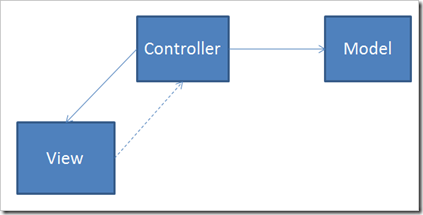
In such a case the Web Part is responsible for orchestration and coordination of the flow of control. The Web Part will create instances of commands and view models; it will instantiate layout templates and pass the view models to them. Very simple indeed.
image


For our Web Part class...

public class DailyWeatherWebPart : System.Web.UI.WebControls.WebParts.WebPart {
    protected override void OnLoad(EventArgs e) {
        base.OnLoad(e);
        this.EnsureChildControls();
}

    protected override void CreateChildControls() {

        base.CreateChildControls();

     var connectionString = ConfigurationManager.ConnectionStrings["AppSqlConn"].ConnectionString;
     var weatherCommand = new GetWeatherCommand(connectionString);
     weatherCommand.Execute();
     DailyWeatherControl weatherControl = 
       (DailyWeatherControl)Page.LoadControl("~/_controltemplates/Neimke/WebParts/DailyWeatherControl.ascx");
        this.Controls.Add(weatherControl);
     weatherControl.Model = new DailyWeatherViewModel(weatherCommand.Result);
}
} 


From here we might eventually decide to abstract further the complexities of template instantiation and error handling to another base class.

What have we achieved?
I mentioned at the start of this article that the architecture that we created would provide us with a good base from with to establish norms and standards. And that what we create should lend itself to improvement through further refactoring. And you will recall that I sought to provide a solution to having developers who produce expected outcomes.


image


Given the architecture that I have presented, I could now expect that, when I ask for web part to be developed, I already know what the delivery should look like:
  • A Command
  • An Entity
  • A ViewModel
  • An HTML Layout Template
  • A Web Part class
This makes the job of passing or failing code based on conformance much simpler. And by being able to have such disciplines at play within our development team should ultimately lead to higher quality outcomes.

The final layout of our solution looks like this:


image


Where to from here?…
 In the next article I want to take the code refactoring deeper to look at how we might introduce new patterns that will allow us to increase the testability of our code.

Sunday, February 7, 2010

SharePoint (2007 or 2010) Architecture - Part 1: Building a case for quality

imageIn the wild, the development of SharePoint customizations is still a bit like the Wild West when compared to where things are at with other forms of modern software development. I'm not blaming the developers or even the architects for this dilemma because developing and deploying custom software for SharePoint can be difficult - a bit like trying to swim against a strong tide. In this article I would like to explain some simple concepts that might make your overall SharePoint development and maintenance experience more bearable.
Note:
If you are developing solutions for SharePoint then you should also read my other SharePoint development articles and, in particular my article about using your build server to help make the process of deploying your customizations much nicer.
What is architecture?
Architecture refers to things that are designed and made by people. And the design is generally a carefully planned thing. This allows us to logically separate between things that a child might build with Lego, mud or clay and, let's say, the structure of a well-designed chair or a house.
Sometimes the code that gets deployed to SharePoint shares more in appearance with mud pies or messy piles of Lego than with a well-planned and organized room.
To be of a high good quality, it is required that both the architectural underpinnings of your code be strong and firm and also that the organization be consistent and well formed.
Note:
Fowler suggests architecture is the things that the senior developers on the team agree are probably important, and are hard to change. Re: the house, the architecture might be the direction it points, and whether it is one storey or two. The organization of the room is just code that's easily changed.
Why is architecture important?
Let's say that you produce a single web part and that you deploy it into SharePoint. For the next month or so you might get some change requests and you are happy to wear the pain of re-deploying it and everybody is happy. But multiply that pain by 3 or 4 (or more) developers and by 4 or 5 (or more) applications and by 3 or 4 (or more) features... and you are already in living, developer hell. And that's even before the first round of maintenance comes along from your initial deployments.
At this point in time - and I'll ask you to take another look at that scoop of spaghetti in the image - your agility and therefore your ability to change is gone! Before you know it, you are unable to meet the demands of the business and you are spending your nights working out how 4 year old code works.
Identifying good and bad code?
There are some worrying signs to look out for and code smells that you can observe in your SharePoint code repositories if you are hoping to avoid the aforementioned road to hell.
  • Your web part classes have database access code in them
  • Your web part classes have intimate knowledge of how to configure things
  • Your web part classes have more than a couple of methods
They are the commonsense metrics, now let me give you my gut-feel metric:
  • If you have more than 120 lines of code - in total - in your web part class file then that is a "smell" and needs further investigation. And yes, that includes Namespace declarations and everything!
If we apply good architecture and code organization techniques to our SharePoint coding, then our code will be well factored and easily understood across the whole team. It will be easier to change and manage.
How chaos occurs – a short walk through
image
A day comes when you need to develop a new Web Part and add it to your solution. You might come up with an idea for this web part and then ask one of your developers to implement it. Let's suggest that our code has an unclear architecture and that the organization of it is untidy. What will the developer deliver?
He may decide to implement a single web part class with lots of code in it. Code which connects to a database, grabs some data, caches it, and then sets out to render the user interface of the web part by reading through whatever object the database returned.
Alternatively your developer may choose to start creating a bunch of classes within your solution to do things. But what are these classes? What are they called? And are we happy with the concepts that are being introduced?
I'm not saying that any of these things is necessarily the wrong thing, but in the absence of specific guidance and existing patterns, you can see how things can get rather messy indeed.
What you want is that, when you ask for the web part, you will know pretty much exactly what will be delivered in terms of a final set of artifacts.  So that what is built when creating one web part will be the same as what is built when creating the next one. Building upon common foundations and delivering with consistent organization.
Taking the architectural path
Think of your web part as you would any other architectural artifact and layer your software so that you have a sensible separation of concerns between each of the different functions within your application. But don't start by thinking that you have to build something that is perfect, there is no perfect. Perfect is whatever works best for you and your team. But we still need to work along common patterns and standards, so let's start with the some age old sensibilities and separate things along the lines of:
  • Models (getting our hands on the data)
  • Views (showing awesome stuff to our users)
  • Controllers (orchestrate the processes between data and view to ensure that things run smoothly)
Notice that I didn't mention anything about choosing your favorite IoC container or how to create Mock classes for testing? I'm just skimming across the top - because I am assuming that your team needs time to learn how to get better. The low hanging fruit is what is important when you are trying to improve your coding standards... you don't need to start at the lowest level. 
My suggestion is that, when you are starting your improvement journey, be pragmatic, start somewhere around halfway between heaven and hell. Because premature optimization is the root of all evil, and, while you can try to start out by cramming every concept that you’ve ever read about into your architecture right from the beginning, a lot of the time patterns within those architectures are put in place to solve problems that you may never even experience. So while your architecture might feel elegant... you ain't gunna need it!
In the next article I will talk through a specific implementation for a SharePoint Web Part and highlight its benefits.

Saturday, January 30, 2010

FUSE Labs and Social Media – Producing great tools for the wrong people?

I never told many people about this but, last year I got pretty anxious for a while about the informal way that personal data had becoming readily available through social networking sites such as Facebook, LinkedIn and Twitter.  This was reinforced to me when rich clients such as TweetDeck and Fishbowl started coming out and I could see the real power of the API’s of these sites in full view.  Even more when I decided to go and take a peek at the API’s that Facebook makes available to developers and started to understand that I might be sharing personal information about my relationships or my location without even being fully aware who I was giving it to.

I remember at the time being able to completely visualize what sort of tools the bad guys would be capable of creating if they really put their minds to it.  Not to belittle the efforts of the people who wrote TweetDeck and Fishbowl, but it’s really getting easy to build very rich dashboards to represent social graphs and with a little additional logic, I could see that you could pivot around on this data in some really interesting ways.

Fast forward 8 or 9 months and the game just keeps getting a whole lot more interesting with people such as Twitter allowing applications to store the geolocation along with the other bits of the tweeted data.  This technical shift opens the door for new innovations to rise up in how we visualize information based on the location when it was being created.  The following image shows a picture of Bing’s new Twitter Map tool:

image

As you can see from this picture, I can see location-based tweets over time (past 7 days) and then I can use filters to isolate certain data (e.g.: view only tweets made by a single user).  Couple that with tools like the new Silverlight 4 Client for Facebook and you start to understand how much intelligence you could build around this stuff:

image

Couple that with the potential reach that you get across a social graph from deploying Facebook applications and you could build a very interesting, location based “listener”.  Pictures, events, places, comments, and times.

Using technology for good

OK, so that’s enough paranoia, let’s look at what I think needs to happen to balance the scales a bit.  We know that technology can be a terrific aid in helping to uphold safety, just as it can be used for bad stuff.  Here is a link to the text from Steve Ballmer’s recent speech at the Worldwide Public Safety Symposium.

In and of itself, Bing Twitter Maps is not massively useful right now.  For example a relatively minor number people are producing geo-coded tweets and so what you see when you look at this tool is a demonstration of capability.  But think about how useful tools such as this could be in a crisis sometime in the not too distant future.  A tool such as this could help somebody who was in distress to get a message out.  It could be used to monitor activity near the scene of a crime – such as a burglary – and it could help groups of people who are often in disparate locations to understand when they were located near other members of the group.

For some of these types of scenarios to play out, I believe that we need more metadata so that different classes of information could be visualized in better ways.  Consider what could be done if there was a metadata standard for Twitter which was the equivalent of a 911 or emergency message.  Metadata such as this would allow individuals to send out distress signals and to perhaps have them acted upon.

Similarly, what if there was the ability for certain agencies to annotate their data with certain information which carried special weight with regards to public interest?  Fire departments or local councils could start to create messages which plugged in to the raft of tools that are starting to emerge.  Imagine a social network dashboard which was able to interrupt you with an important announcement about an event which was occurring nearby to you.

I think that as more standards start to emerge in the way that these types of information are transmitted, we will start to see some really amazing experiences being built and some which carry tremendous social responsibility messages to us. 

Until that day arrives, maybe we will be dazzled by new rich renditions of information, but whether it has great application in our lives might be debatable.  With the current tools the way they are, I think that there’s more on offer for petty stalkers than there is for seriously digital communities, groups, and individuals.

Tuesday, January 26, 2010

Creating and running an Azure package by hand

Note: there appears to be a bug in this which is currently preventing the web application from "spinning up" on my machine.  I'm not sure what the problem is but I will correct this post when I find it.


Recently I was running a limited version of Visual Studio which didn’t allow me to build Azure packages because the VS and Azure bits were out of sync.  So I ended up having to build the Azure bits by hand and I thought that in this post I would share how that was done.  In this post we will create an ASP.NET MVC application and attach it to an Azure Web Role.  After that, we will deploy it to our development fabric and run it.
Create the ASP.NET MVC Application
  1. Open Visual Studio, click New Project and create a new ASP.NET MVC 2 Web Application called HelloCloudService
    image
  2. Manually add a reference to the Azure .NET assemblies (these are located in the ref folder where you installed the SDK – the default path is C:\Program Files\Windows Azure SDK\v1.0)
    image
  3. Change your Index action so that it looks like this:


    public ActionResult Index()
    {
        if (RoleEnvironment.IsAvailable)
        {
            ViewData["Message"] = "Welcome to the Cloud!"; 
    } else {
            ViewData["Message"] = "Welcome to ASP.NET MVC!"; 
    }
    
        return View();
    }


  4. Press F5 to run your web application and you should see that we are indeed NOT running in the Azure cloud fabric.

     image

Create the Web Role

Next we will create our Service Definition (.csdef) and a Service Configuration which matches it (.cscfg)
  1. Go to the folder which contains your Web Application project folder and create another folder alongside it called WebRole

    image
  2. Open the WebRole project and create a new text file named HelloCloudService.csdef.  Open the file using Notepad.  You can read about the schema for the Service Definition file here.
  3. Add the following text to your .csdef file and press save:

    <ServiceDefinition name="HelloCloudService"

    xmlns="http://schemas.microsoft.com/ServiceHosting/2008/10/ServiceDefinition">
      <WebRole name="HelloCloudServiceWebRole">
        <InputEndpoints>
          <InputEndpoint name="HttpIn" protocol="http" port="80" />
        </InputEndpoints>
      </WebRole>
    </ServiceDefinition>


  4. Open the Windows Azure SDK Command Prompt in elevated mode, type the following command, and press enter (you will have to change any paths to suit your file locations):

    cspack "D:\Sandboxes\2010Wave\HelloCloudService\WebRole\HelloCloudService.csdef"

    /role:HelloCloudServiceWebRole;"D:\Sandboxes\2010Wave\HelloCloudService\HelloCloudService" 
    /generateConfigurationFile:"D:\Sandboxes\2010Wave\HelloCloudService\HelloCloudServicePackage\HelloCloudService.cscfg" 
    /out:"D:\Sandboxes\2010Wave\HelloCloudService\HelloCloudServicePackage" 
    /copyOnly

    Interesting things to take note of here are:


    • We are generating a Service Configuration file named HelloCloudService.cscfg and placing it within the deployment package folder.  This file is based on the Service Definition that we specified in step #3.  So had we declared any configuration items in that .csdef file, there would be stubs for their values in the Service Configuration file.
    • By using the /copyOnly flag, all files are copied into a folder hierarchy whereas omitting this flag would produce a .cspkg formatted file that would be used as a deployment package for deploying to Windows Azure.  That’s what I showed in a previous post on how to deploy into the cloud as part of your build process.


  5. At this point you should have created a CloudService package folder and you should find it positioned like so:

    image
  6. Looking at the structure of that folder we see an elaborate hierarchy:

    image
Running the CloudService in the Development Fabric
  1. From the same elevated command prompt we can check to see the status of the Dev Fabric to see whether or not it is running:

    image 
    You can find the reference documentation for CSRun.exe here.
  2. We can see in the above image my Devfabric service is not running… let’s start it by typing the following commands:

    csrun /devfabric:start


  3. At this point you should see the Devfabric service icon (it’s the one which looks like a blue Windows flag) appear in your system tray icons


    image
  4. Now we can launch our Service on the devfabric by calling /run and passing in the path to the location of our package and the configuration file that we generated using CSPack


    csrun /run:"D:\Sandboxes\2010Wave\HelloCloudService\HelloCloudServicePackage";
    "D:\Sandboxes\2010Wave\HelloCloudService\HelloCloudServicePackage\HelloCloudService.cscfg" 
    /launchbrowser

     Things to pay attention to here are:


    • We are specifying to pass in the Service Configuration file that we created previously as part of our packaging command


  5. After running that command, a browser window should appear with your web site hosted within it but now showing a message of “Welcome to the Cloud!”
      
  6. If you right click on the Devfabric icon in your system tray and select Show UI you will also so that your service is now indeed being hosted in the Devfabric

    image

Monday, January 25, 2010

How to build an Azure Cloud Service package as part of your build process

I explained in a previous blog entry how important, and ultimately simple, it is to create a deployment package for SharePoint as a part of your Continuous Integration process and in this post I’d like to show you how to produce deployment packages for Windows Azure.  This article is laid out in the following sections:
  • Deploying to Windows Azure
  • The CSPack Command Line Tool
  • Automating the Creation of your deployment package
Deploying to Windows Azure
Those of you who have deployed solutions to Windows Azure in the past will know the routine.  That is, you must:
  1. Create an account and then login to the Windows Azure portal (this is done through http://azure.com but for the purposes of this article I am going to use the tech preview site).
  2. Create a cloud service project for your account – in the following image I have 3 cloud services in my PDC08 CTP account:

    image
  3. Then click on a Cloud Service project to access the user interface to upload new deployments and toggle them between staging and production:

    image
The packages that you upload into the Cloud Service project is a Cloud Service Package format and is created by an Azure SDK tool called CSPack.exe.  These Cloud Service Packages have a .cspkg file extension and are also built into the Visual Studio tooling so that creation of these packages is all done seamlessly as part of using the Visual Studio tools.  As mentioned in this article, this is as simple as right-clicking on a VS project node and choosing the Publish option.

The CSPack Command Line Tool
CSPack.exe is a tool which comes as part of the Windows Azure SDK and, when installed, it can be found at C:\Program Files\Windows Azure SDK\v1.0\bin\cspack.exe
image
As per the documentation for CSPack, the syntax for using this tool to create a package is:
CSPack <service-definition-file> [options]
And the options that we are interested in are:

Argument
Description
/out: <file | directory>
This option indicates the output format and location for the role binaries.
/role:<rolename>;<role-binaries-directory>;
This option specifies the directory where the binaries for a role reside and the DLL where the entry point of the role is defined. The command line may include one /role option for each role in the service definition file.

And actual sample usage would look something like this:

cspack \ServiceDefinition.csdef 
/role:AmbientPlacesWebRole;\CloudService.WebRole 
/out:AmbientPlaces.cspkg

In this example you can see that we are passing in the path to the .csdef file which describes the definition of our service, including what configuration items that we are specifying.  Next we pass through the directories and names for each role that is specified in our Cloud Service Defnition (.csdef) file.  Finally we can optionally be explicit in specifying the name and location of our outputted Cloud Service Package (.cspkg).

Automating the Creation of your deployment package

Building the solution as part of our automated build process is very similar to what we did when we created our SharePoint deployment package my previous article on the topic:

[SharePointBuildProcess[4].png]

Except that, instead of using WSPBuilder.exe, we would use CSPack.exe in those places.

You can refer to my previous article to see how we did it for SharePoint packages, but for building Cloud Service packages I would refer you instead to the following blog post which does an excellent job of explaining on way to do the same thing from an MS Build script:
http://blogs.msdn.com/domgreen/archive/2009/09/29/deploying-to-the-cloud-as-part-of-your-daily-build.aspx
Another option that is available is to use the Windows Azure PowerShell Cmdlets to customize your deployment process:
http://blogs.msdn.com/chabrook/archive/2009/10/26/azure-powershell-cmdlets-announced.aspx